Most people shop for a walking machine by staring at the machine. This under desk treadmill guide starts somewhere else: at your desk, your elbows, your floor and the coworker on the other side of the partition. A treadmill that looks perfect online can still fail in a real workspace because the desk won’t rise high enough, the footfalls thump through the ceiling below, or the belt is so short that slow walking feels like shuffling.
So think of this under desk treadmill guide as a fitting manual rather than a ranking. We’ll cover desk height, the slow speed range, deck length and width, noise on calls, floor vibration, remotes and auto-stop, cords, a first-week routine, typing accuracy, storage, upkeep and the people who should skip the whole idea. If you’re still deciding which low-profile machine to buy, our roundup of what to look for in the best walking pads is the shopping companion to this fitting manual.
Quick answer: what makes an under-desk treadmill work
The short answer
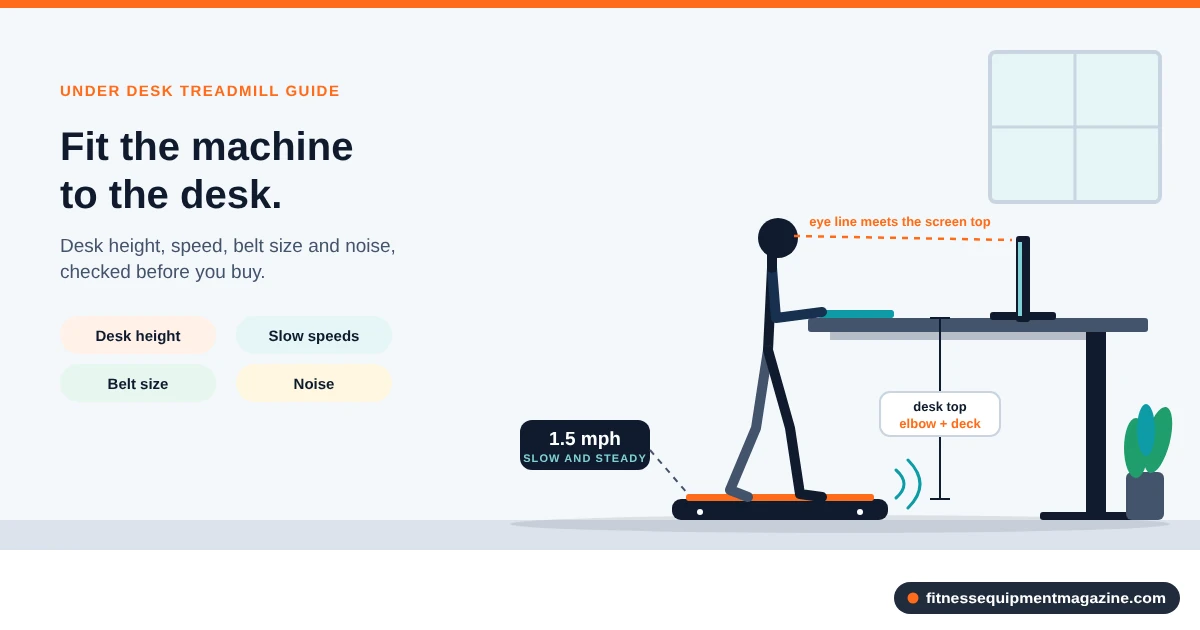
An under desk treadmill works when four things line up: a desk that rises high enough to keep your elbows near 90 degrees while you stand on a raised deck, a controllable slow speed, a belt long and wide enough for a relaxed stride, and a noise level your room can tolerate. Get the desk math wrong and nothing else matters.
- Who it fits: desk workers with a height-adjustable desk, a few feet of clear floor behind it, and a plan to walk slowly while doing light computer work.
- The big tradeoff: a machine small enough to slide under a desk usually gives up top speed, deck length and some stability. That is fine for slow walking, and a poor deal for anyone who hopes to jog on it.
- Do before buying: measure your standing elbow height, your desk’s top range, the floor space behind it and the path to your closet. The measurement workflow in this under desk treadmill guide takes about twenty minutes.
How we researched this
How we researched this. This under desk treadmill guide is research-based. It draws on manufacturer specification patterns, federal guidance and the ownership problems buyers commonly report. We have not hands-tested the machines described here, and we name no brands or models on purpose. Every number is a typical range, so confirm it on the spec sheet of the exact machine you’re considering.
Last reviewed and how current this is
How current is this?
Last reviewed: October 2026. Specifications, prices, warranty terms and recalls change often. Before you buy any machine, search the CPSC exercise equipment recall list for the brand and model. Some links on this site may be affiliate links. If you buy through them we may earn a commission at no extra cost to you. Recommendations are based on the criteria in the article, not payout.
What an under-desk treadmill is, and what it isn’t
An under-desk treadmill is a low, slim walking machine built to sit beneath a height-adjustable desk. It runs at slow speeds, usually somewhere between a stroll and a brisk walk. Most have a short deck, a compact motor and a remote instead of a console with handrails. You stand at the desk, tap the remote with your toe or hand, and walk while you answer email.
That description overlaps heavily with a walking pad, and the two names get used interchangeably. A walking pad is the category: a handle-free, often foldable, low-profile belt machine. An under-desk treadmill is the same hardware when you use it at a desk. The distinction matters because the desk adds constraints a living-room walking pad never faces. If you want the category-level comparison, we cover it in walking pad vs treadmill and which one fits your space.
What it does well
The honest appeal, as any fair under desk treadmill guide should admit, is simple. You stack light movement onto work you already do, so you don’t have to carve out a separate exercise hour. Some people like that their afternoon slump has a place to go. Others like that the machine lives in the room where they spend the day, so there’s no commute to a gym or a basement.
The federal Physical Activity Guidelines for Americans encourage adults to move more and sit less. Slow desk walking is one way some people act on that. We won’t promise outcomes, though. How much it helps depends on your pace, your time and your health, and a clinician is the right person to ask about your own situation.
What it does badly
It isn’t a running machine, and it isn’t a replacement for a full treadmill. The belts are short, the motors are sized for walking, and the frames are light. Push one past its intended speed and you’ll feel it in a belt that slaps, a motor that strains and a stride that has nowhere to go.
It also isn’t a silent object. Even a well-built unit makes some motor hum and footfall sound, and your desk, floor and neighbors each carry that sound differently. We’ll spend a whole section on that, because noise is the most common reason people stop using these machines.
Two names, one decision
If a listing says “walking pad,” “under-desk treadmill” or “desk treadmill,” read the spec sheet the same way. Names are marketing. Deck size, speed range, weight limit and the desk-height math are what decide whether it works at your desk.
Where this under desk treadmill guide fits in the series
Think of three layers. The treadmill buying guide on motors, belts and warranties explains the specs themselves. The walking pad buying page narrows to the low-profile category. This under desk treadmill guide handles the fit: will the machine live at your desk, with your body and your noise limits, without becoming a very expensive coat rack?
Desk height: the first filter in any under desk treadmill guide
Here’s the part that catches people out. Standing on a treadmill deck lifts you off the floor by a few inches. Your elbows rise with you, so the desk has to rise too. A desk that is perfect for standing flat-footed can sit three or four inches too low once you step onto the belt, and your shoulders pay for it by lunchtime.
So before you look at any machine, find out what your desk can actually do. Everything else in this under desk treadmill guide builds on that one measurement.
The elbow rule and the deck-height add-on
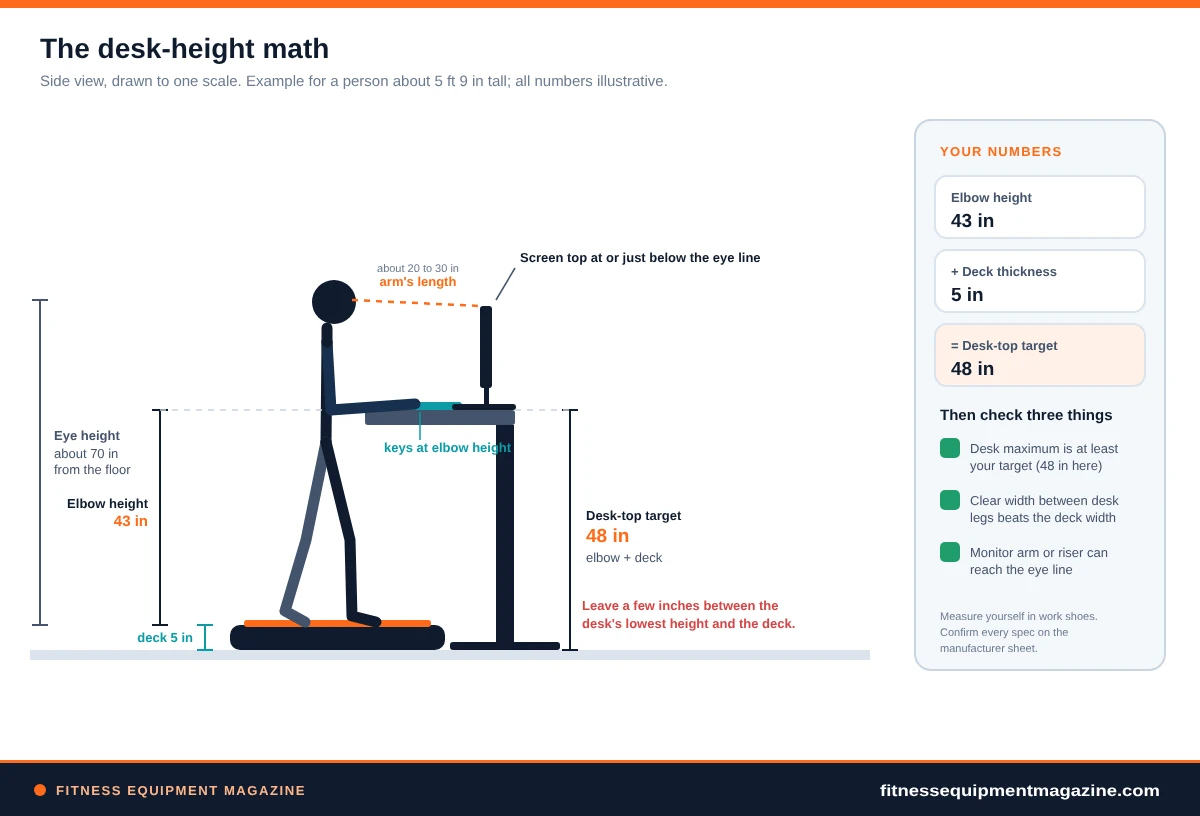
Stand relaxed in your normal work shoes, with your upper arms hanging at your sides. Bend your elbows to about 90 degrees so your forearms run parallel to the floor. Have someone measure from the floor to the underside of your elbow. That number is roughly where your keyboard surface should sit.
Now add the deck. Low-profile walking machines are commonly a few inches thick, often somewhere around 3 to 6 inches once you count the frame and the belt. Your desk target is your elbow height plus that thickness. In an illustrative example, a person with a 43-inch elbow height and a 4-inch deck needs a keyboard surface near 47 inches.
That is higher than you might expect. Many height-adjustable desks top out in the neighborhood of the high 40s, and some stop lower, so a tall user can run out of travel. Always check the manufacturer’s stated maximum height, and measure it yourself if you can.
Monitor, keyboard and the posture that goes with them
Elbow height sets the keyboard. The monitor follows a different rule: the top edge of the screen should sit near eye level or a little below, roughly an arm’s length away. Because the deck lifts your eyes too, a monitor that was fine while sitting is probably low now. A monitor arm or riser fixes that cheaply.
Laptops are the awkward case. The screen and the keys are attached, so you can’t put the keys at your elbows and the screen at your eyes at once. If you walk and work on a laptop for hours, a separate keyboard and a laptop stand are worth the small spend. Otherwise, one of your shoulders or your neck takes the compromise.
Save the preset
Most motorized sit-stand desks let you store two to four heights. Save one labeled “walking” at your elbow-plus-deck number, one for plain standing, and one for sitting. You’ll stop eyeballing it, and you’ll stop leaving the desk at an awkward in-between height.
Frame width, crossbars and wobble
Height isn’t the only desk spec that matters. The treadmill has to fit between the legs, so measure the clear width between them, and the position of any crossbar or motor housing that runs along the back. Many walking decks are 16 to 20 inches wide, but the desk frame that looks roomy from the front can pinch at the rear.
Wobble is the quiet problem. Walking sets up a gentle rhythm, and tall, light desk frames can sway with it. Monitors bob, coffee ripples, and the mouse pointer feels slightly seasick. Desks with a rear crossbar, a wider foot and a heavier top tend to behave better when extended high. Walking at low speeds helps too, since the footfall rhythm is slower and softer.
- Desk maximum height is at least your elbow height plus the deck thickness, with a little spare.
- Clear width between the legs exceeds the deck width by a few inches on each side.
- The desk top is at least 24 to 30 inches deep, so you can stand upright without leaning.
- The desk stays steady when you press on it at full height.
What if the desk doesn’t adjust?
A fixed-height desk, which is the usual 29 to 30 inches, doesn’t work for walking, full stop. At that height your arms would hang well below your elbows. A desktop converter that sits on top of a regular desk can work, but converters have their own limits. Many raise the keyboard only a limited distance, and some can’t reach the elbow-plus-deck number for a taller person.
If a converter is your plan, treat the converter’s maximum keyboard height as the number to check. And ask whether the whole assembly stays stable. A heavy monitor on a tall arm on a converter on a wobbly desk is a recipe for bounce.
Speed range and why fine control matters in an under desk treadmill guide
Under-desk machines are built for slow walking. Many spec sheets list a range from about 0.5 mph to something like 3.5 or 4 mph, with a few stretching higher. That top number is mostly marketing for desk use. The speeds you’ll actually live in are a lot lower.
Where desk walkers commonly settle
People who type and click while walking usually pick a pace that feels like strolling through a museum. Reports from owners cluster somewhere around 1 to 2 mph for focused work, with the belt slower on calls and faster during reading or thinking tasks. A faster pace is possible, but fine motor control tends to suffer, and the typing errors show up first.
For scale, 1 mph is about 1.6 km/h, so a 1.5 mph pace is a slow, relaxed step. No under desk treadmill guide can prescribe a speed for you. Pick whatever lets you keep your hands accurate and your breathing quiet.
Fine control beats top speed in every under desk treadmill guide
Because the useful band is so narrow, how the remote steps through speeds matters more than where it ends. Some machines move in 0.1 mph increments. Others jump 0.5 mph at a time, and that jump is large when your comfortable pace is a narrow target. Going from 1.5 to 2.0 on a coarse remote can feel like someone swapped your legs.
Look for four things in the listing, not just the maximum. First, a low minimum speed, ideally around 0.5 mph or lower. Second, small increments. Third, a gentle start ramp so the belt doesn’t lurch. And fourth, if the remote supports it, a way to remember a favorite speed.
Why the lowest speeds can misbehave
Slow belts are harder to drive smoothly than fast ones. A motor that is undersized for the user’s weight may stutter or surge near its minimum speed, because every footfall briefly loads the belt. Owners often describe this as a rhythmic hesitation at the slowest settings.
You can’t test this from a listing. You can, however, check the machine’s user weight rating against your weight, and prefer one with real headroom. Heavier-rated frames and bigger continuous-duty motors generally smooth low-speed walking. For the underlying motor language, our treadmill motor guide explains peak versus continuous horsepower.
Treat the display as an estimate
The number on the remote or display is the machine’s own estimate. Many displays read the motor command, not a measured belt speed, so load and wear can change the real pace slightly. If precise pace matters to you, a stopwatch and a marked length of belt are a cheap check. Most people only need consistency, and a repeatable setting gives you that.
Deck length and width for slow walking: an under desk treadmill guide to belt size
A belt that is great for a brisk walk can still feel cramped at a desk, because desk walking has its own rhythm. You look at a screen, not your feet. Your stride drifts, and you correct it late. That is why a bit more deck than the bare minimum buys a lot of peace of mind.
Length: room for a relaxed step, not just a short one
Slow walking uses a shorter step than a normal walk. Many adults take steps in roughly the 18 to 26 inch range at a stroll, though height, leg length and mood move that number around. Add the length of your foot, usually 10 to 12 inches, and a few inches of margin at each end. The result lands near 40 inches of usable belt for an average adult, with taller people wanting more.
Spec sheets complicate this. The overall machine length can be 50 inches or more while the belt you can actually walk on is a few inches shorter. Always look for the “running surface,” “belt length” or “deck size” line, and not the product dimensions. Our explainer on treadmill belt size and what the numbers mean covers the terminology in more depth.
Width: where your attention goes
Belts on these machines are often 16 to 20 inches wide. For a straight-ahead walk, that is enough for hip-width feet. The trouble is attention. When your eyes are on a spreadsheet, your feet wander toward one edge, and a narrow belt gives you less room for the wander.
A wider belt also makes it easier to step on and off, which you’ll do more than you expect. You’ll hop on to take a call and hop off to grab a charger. If you wear wide shoes, have long feet or just feel nervous about stepping off the belt, lean toward the wider end of the range.
A cheap trick for staying centered
Put a short strip of colored tape on the side rails, in line with the middle of the belt, or one on the floor ahead of the front roller. You’ll feel when you drift without looking down. It costs almost nothing and works better than most people expect.
When a shorter deck is fine
Someone who is shorter than average, walks very slowly and will never go beyond a gentle pace can do well on a compact belt. Likewise, a person with a tiny office may value a short, light machine more than extra belt. We’d just ask you to be honest about it. If you might want to lengthen your stride later, buy the extra inches now.
For deeper comparisons of belt and motor specs across the whole treadmill family, the full treadmill buying guide is the place to go.
Noise, calls and floor vibration: the under desk treadmill guide for shared spaces
Noise decides whether the machine you choose with this under desk treadmill guide becomes a habit or a closet resident. In a shared office, the question is whether your colleagues hear you on calls. At home, it is whether your family, or the neighbor downstairs, hears you at all. The two problems have different causes, so it helps to split them.
The three sources of sound
The first source is the motor and drive. It makes a hum or whir that is fairly steady and that rises a little with speed. The second is footfall, the soft thud every time a shoe lands on the deck. The third is mechanical noise: a belt rubbing the side rail, a dry roller squeaking, a loose screw rattling.
Footfall and the floor path are usually the loudest in the room below, because impact travels through the structure. The motor hum is the one your laptop microphone picks up. Mechanical noise is the most fixable, and it often means the machine needs adjustment or lubrication.
Be skeptical of decibel numbers
Listings sometimes quote a number of decibels. We’d treat them cautiously, because brands measure at different distances, speeds and loads, and nobody labels the method. A figure that sounds quiet may describe an empty belt at the slowest setting, not a person walking at a normal pace.
More useful signals are owner reports about footfall thump, the presence of a cushioned or shock-absorbing deck, and whether the motor design is described as brushless or direct-current. None of those prove silence. They do point you toward the quieter end.
Keeping video calls clean
Most of what a call picks up is hum, not footsteps. You can fix that cheaply. A headset with a boom microphone sits an inch from your mouth, so your voice is loud and the motor stays quiet by comparison. Laptop microphones, by contrast, sit a couple of feet from the belt and catch everything.
Software noise suppression helps with hum but not with irregular breathing or a sudden step off the belt. Slow down a notch for calls, keep your cadence steady, and pause the belt for the five minutes where you have to talk the most. Nobody will hold the pause against you.
Floor vibration and the neighbor downstairs
Impact noise is the thing that causes complaints in apartments. A concrete slab swallows it. A wood-framed floor, especially in the middle of a span between supports, acts like a drum skin. Standing nearer a load-bearing wall often feels and sounds stiffer than the center of the room.
A dense mat helps by spreading the force and cushioning the feet. Soft, spongy mats can help a little but also let the machine rock, which makes things worse. If you live above someone, treat noise as a neighbor question first and a gear question second. Our dedicated page on treadmill noise in an apartment goes deeper on leases, mats and timing.
Talk first
If you share a floor or ceiling with someone, mention the plan before the first walk. Offer to keep it to daytime hours and ask them to tell you if they hear it. A short, friendly conversation prevents a long, unfriendly one.
Workspace plan, clearances and cord management in the under desk treadmill guide
A treadmill adds a surprising amount of footprint to a small home office. Even a slim one needs a place to live while you walk, a place to live while you sit, and a path for you to get on and off. Draw it on paper before you buy, or tape the outline on the floor. Of everything in this under desk treadmill guide, this step catches the most bad purchases.
Reading the floor plan
Start with the desk. A typical sit-stand desk is 48 to 72 inches wide and 24 to 30 inches deep. The treadmill slides under it, with the front of the belt a little way in from the desk edge, so the rear end of the deck sticks out into the room. That overhang is where you step on and off, and it is where most clearance problems appear.
Most manuals ask for open floor behind the machine, and the requested distance varies. Slow walking pads often ask for less than full-size treadmills, but the number is the manufacturer’s call, not ours. Read the manual’s clearance section for the exact model before you decide where the chair goes.
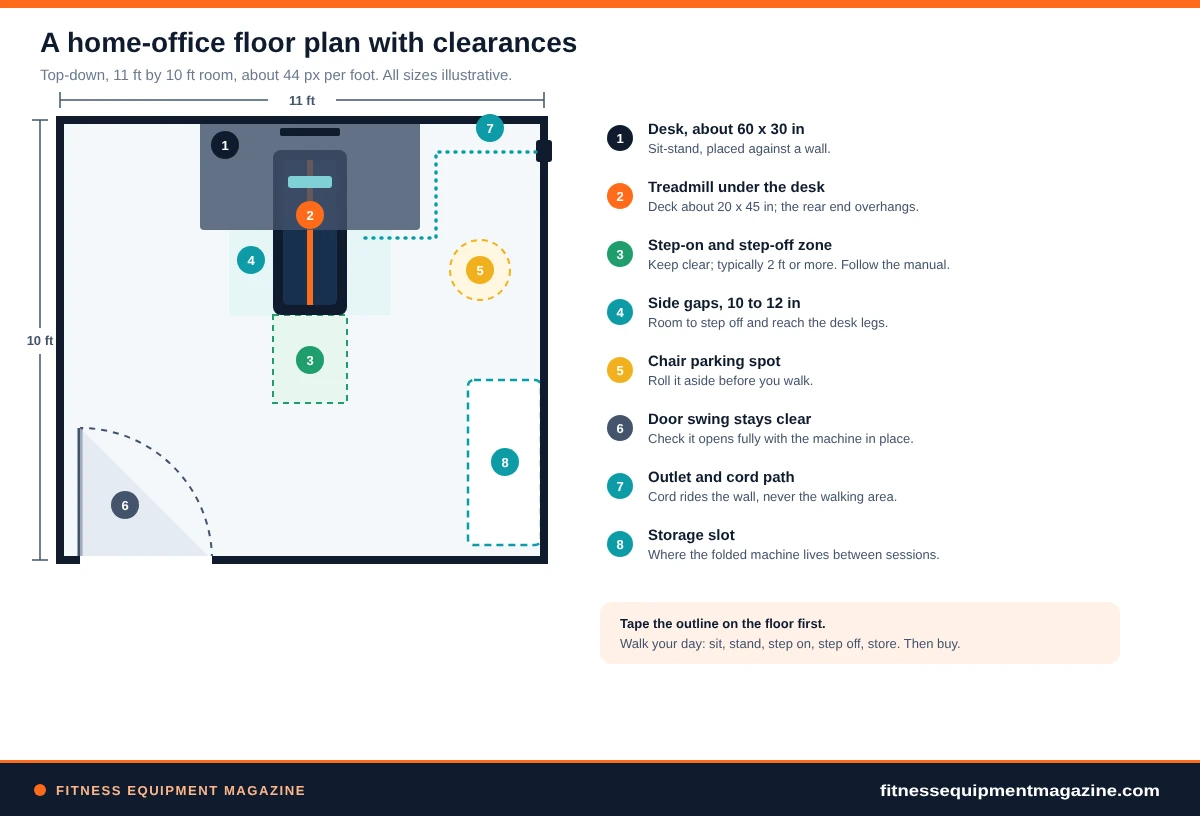
Where does the chair go?
This is the question nobody asks until the box is on the porch. If the treadmill sits under the desk full time, your knees and feet may have little room when you sit. The usual answers are to pull the machine out and park it beside the desk, to fold it upright against a wall, or to keep a chair that rolls out of the way in a defined spot.
Pick one answer and test it with a cardboard template the size of the deck. Walk through your day. How often do you switch between sitting and walking? If it’s three times an hour, a machine that takes two minutes to move will gather dust within the month.
Floor surface and mat
Hard floors and low-pile carpet are the friendliest surfaces. Deep carpet can let the machine tilt or rock, and it can also trap heat and lint around the motor. A firm, dense mat under the deck protects the floor, steadies the machine and softens footfall noise. Leave a few inches of mat past each side so the feet sit flat.
Cables and cords: three places they cause trouble
Your desk moves up and down, your treadmill needs power, and your monitors and chargers want cable runs too. That’s a lot of wire in a small zone. Cords cause trouble in three predictable spots: under the belt, behind the motor housing and at the desk’s moving legs.
Rules that prevent most cord trouble
- Run the treadmill’s power cord along the wall side, secured with clips, never across the walking area.
- Leave a loop of slack on every desk cable so the lift motor doesn’t tug or pinch it.
- Use a single surge protector rated for the combined load, and follow the treadmill manual’s advice about extension cords.
- After setup, raise and lower the desk through its full range once, slowly, with your eyes on every wire.
That last check also catches the other classic problem: a desk that lowers onto a treadmill parked beneath it. Some desks have collision sensors. Many don’t. Leave a few inches between the underside of the desk’s lowest position and the top of the machine, or move the machine out first.
Remote, safety clip and auto-stop: what an under desk treadmill guide should check
With no handrails and no console in front of you, a desk treadmill relies on its remote and its protective features. These are the details worth reading about, because they matter the moment something unexpected happens.
Remote types and what to ask
Most machines ship with a small handheld remote. Some offer a wrist strap, a desk-mounted button, a phone app or a foot-tap sensor. A physical remote with big, distinct buttons beats a phone app in daily use, because an app means unlocking the screen and finding the right menu while the belt is moving.
Ask three questions. Can you stop the belt with one press? Does the remote use replaceable batteries, and what happens if it dies mid-walk? And is there a backup control on the machine itself? An unresponsive remote is annoying at best. At worst, you’re stuck walking until you can reach the plug.
The safety clip and why some machines skip it
Full-size treadmills usually include a safety key on a tether. If you stumble backward, the clip pulls free and the belt stops. Many compact machines omit it, often because there’s no console to hold it. Some use a magnetic key on a clip, and some rely on a stop sensor under the belt instead.
We’d treat a tether or an equivalent as worth having, particularly for anyone who looks at the screen more than at their feet. If a machine lacks one, you can still be careful: keep the belt slow, keep your phone in a pocket, and step off before you reach for anything on the floor.
Auto-stop, auto-shutoff and sensors
Marketing pages list several automated features. A few are genuinely useful. An idle timer that stops the belt after a few minutes without a command is handy, since it protects you if the remote gets pressed accidentally. A stop sensor that detects when no one is on the belt can be useful too, though sensitivity varies and false stops during slow walking are common complaints.
Treat the claims as questions for the seller. How does it detect a person? How fast does the belt stop? Does it restart slowly? The answers may not be written down, so a short email to customer support is reasonable.
Safety
Keep children and pets away from a moving belt and the gaps around it. Unplug or switch off at the wall when you’re done, and check the CPSC exercise equipment recall page for any model you plan to use, including a secondhand one. If you have balance concerns or health questions, ask a clinician before starting.
Stepping on and off
Most near-misses happen at the edges of a session. Stop the belt completely before you climb on, or start at the lowest speed and step on with both feet side by side. Reverse the routine on the way off. Don’t step onto a moving belt that’s running at a brisk pace, and don’t turn around on a moving deck to talk to a coworker.
Loose laces and long trousers deserve a glance. So does anything on the floor behind the machine, such as a bag strap or a charging cable that wandered over the rear edge.
The pre-purchase measurement workflow: the under desk treadmill guide in eight steps
This is the step-by-step version of the whole under desk treadmill guide. It takes about twenty minutes with a tape measure, a pencil and a sticky note. If you do it before you open a shopping tab, you’ll filter out most of the wrong machines automatically.
The eight steps
- Measure your standing elbow height.Do it in your work shoes, relaxed, with elbows at about 90 degrees. Write down the floor-to-elbow number.
- Add a deck allowance.Use 4 to 6 inches for now. That gives a target keyboard height range to compare with your desk.
- Check the desk’s top height and travel.Raise the desk fully and measure to the keyboard surface. If the maximum is lower than your target, you have a desk problem before you have a treadmill problem.
- Measure the space under and behind the desk.Note the clear width between legs, any crossbar height and the open floor from the desk’s rear edge to the nearest obstacle.
- Check the floor and the room below.Hard floor, carpet or mat? Is someone living or working underneath? That decides how much you’ll care about footfall.
- Find the outlet and the cord path.Measure the distance from the machine’s likely position to the outlet. Plan a route along the wall.
- Plan the parking spot.Measure a closet, a slot behind a door or the space under a bed. Note height, width, depth and how you’d lift the machine.
- Compare to spec sheets.Look for running surface, overall height, weight, user weight limit, minimum speed, speed increment, safety features and warranty length.
How to use your numbers
The decision rule
If your desk can’t reach the target height, fix the desk first. If the floor plan doesn’t work on paper, a shorter or foldable machine may help, but only if its running surface still fits your stride. If the room below is sensitive, put noise at the top of your list.
Three hypothetical shopper profiles for this under desk treadmill guide
These are made-up examples to show how the rules combine. They’re not case studies of real people.
Hypothetical
The tall remote worker
Elbow height of about 47 inches, desk maximum of 48. The deck allowance pushes the target past the desk’s reach. The fix is a taller desk or a thinner machine, not a better treadmill brand.
Hypothetical
The upstairs renter
A second-floor apartment over a neighbor, a wood floor and a 30-inch-deep desk. Footfall transmission matters most. A dense mat, daytime-only use and a conversation with the neighbor come before any feature comparison.
Hypothetical
The call-heavy manager
Spends half the day on video. The priorities are a quiet motor, fine speed control, a headset with a boom mic and an easy pause button. A longer belt matters less than a remote she can use without looking.
Setup day and a general first-week routine: the under desk treadmill guide for beginners
Unboxing day is exciting, and that excitement is how people end up with a sore Tuesday and a dusty Friday. Desk walking is a skill, because you’re teaching your hands and feet to cooperate with a belt. A gentle first week gives that skill time to settle in. What follows in this under desk treadmill guide is a general framework, not a prescription, and it isn’t medical advice.
Setup day: do the boring things first
Read the manual’s assembly and placement pages even if you think you don’t need to. Put the machine on a level spot, check that the feet sit flat and plug it into the wall or a good surge protector. Attach the safety clip if there is one. Then pair the remote and test the stop button before you stand on the belt.
Next, run the belt empty at the lowest speed for a minute. Listen for squeaks and watch whether the belt drifts toward a side. If it does, follow the manual’s belt-tracking steps before you step on. Brand-new belts often need a small adjustment after the first few uses.
Why the first week looks like this
Day one is about the machine, not about productivity. Learn the remote, practice stopping and starting, and get used to the feeling of the belt without trying to type. On the second day, add something low-stakes like reading email. By the fourth day, many people feel ready to add the mouse.
Fatigue sneaks up. Calves, feet and the lower back can feel the difference between standing and walking even at a gentle pace. Listen to your body, keep sessions short and spread them across the day. If you feel pain rather than ordinary tiredness, stop and talk to a clinician.
What changes in week two
By the second week, the belt starts to feel normal and attention goes back to work. This is when most people find their pace and their favorite tasks for walking. Notice which jobs go well, such as inbox triage, reading, brainstorming or calls where you listen more than you type, and which jobs don’t.
Keep a simple note: a sentence a day about what you did and how it felt. After two weeks you’ll know more about your own routine than any article can tell you. The federal activity guidelines are a good general reference for how adults are encouraged to think about weekly movement, but your own situation is a clinician conversation.
Typing, mouse accuracy, shoes and floors: daily use in the under desk treadmill guide
The first thing people notice is that precision gets harder. Mouse targets feel small, hands pick up the rhythm of the stride and tiny typos creep in. Most of that is solvable with setup, pace and task choice.
Typing while walking
Keep your elbows near 90 degrees and your forearms level, with your shoulders loose. Resist the urge to rest your wrists on the desk edge, because that transmits the stride straight into your hands. Hover instead, and let your upper body stay quiet while your legs do the moving.
A slower pace almost always improves accuracy. So does a keyboard with solid key travel. If typos are persistent, shave 0.1 or 0.2 mph off your speed and see what happens. It is usually more effective than any gadget.
Mouse and trackpad accuracy
The pointer is the hardest part. Fine clicking on small buttons and dragging along tiny sliders all suffer. Three adjustments help most. Slow the pointer speed in your system settings, enlarge the cursor, and use keyboard shortcuts for repeated actions. A trackball or a larger mouse that your whole hand rests on can feel steadier than a small one.
Then match tasks to modes. Many people reserve walking for writing, email, reading, meetings and calls, and sit for spreadsheets, design or any job that needs pixel-level precision. Nobody gets a medal for forcing detail work onto the belt.
Shoes: choose boring ones
Flat, closed, supportive shoes with a grippy sole are the safest choice. Skip sandals, slippers and bare feet on the belt. Socks on a belt can slide. Dusty street shoes carry grit onto the deck, and grit wears belts, so many people keep a clean pair by the desk and swap on arrival.
Floors, mats and leveling
Machines that sit on an uneven spot rock slightly with every step, and that rocking becomes noise and wear. Use a small level if you have one. Adjust the feet until the frame doesn’t move when you press on a corner. Re-check after a few days, since carpet fibers and mat foam compress with use.
Quick wobble test
Stand on the stopped belt and shift your weight side to side. If you feel the frame tilt or hear a tick, adjust the feet before you start. Two minutes now saves a month of squeaking later.
Power, storage, moving and maintenance: the practical end of the under desk treadmill guide
These are the unglamorous details that decide whether the machine is still around in two years, which is why this under desk treadmill guide covers them. They’re also where reading the manual pays off the most.
Power
Under-desk machines typically plug into a standard household outlet. The power draw is usually modest compared with full-size treadmills, but the label on the machine is the final word. Plug it into the wall if you can. If you use a power strip, make sure it is rated for the load, avoid cheap extension cords, and never chain one strip into another.
Unplug the machine when you’re away for a long time, and always when you’re cleaning under it. Check the cord for kinks and nicks every few months. A damaged cord is a reason to stop using the machine until it’s replaced.
Storage and moving
Weight is where people underestimate. Compact walking machines are commonly in the range of a few dozen pounds, and a lift from the floor to a shelf is awkward even when the number sounds small. If you must move it often, look for built-in transport wheels and a handle, and test your own comfort with lifting before you commit.
Storage comes in three flavors. Some units slide flat under a bed or sofa, and you need the clearance number. Some fold in half and lean against a wall, which needs a patch of floor and a wall free of furniture. Others simply stay beneath the desk, which only works if the desk rises high enough above them. If you’re comparing options for tight rooms, our guide to the best treadmill for small spaces goes deeper on folding and footprint tradeoffs.
Maintenance in plain language
The manual is the authority here, since lubrication needs differ. Some belts come pre-lubricated and need periodic treatment with a specific lubricant, while others are designed to run without any. Never guess. The wrong product can damage the belt or the motor.
- Weekly: wipe the belt edges and side rails, vacuum around the machine and check that the remote responds.
- Monthly: look at belt alignment, listen for new noises and check that the feet are still level.
- Every few months: inspect the power cord and plug, tighten visible bolts if the manual allows it and clean dust from the motor area with the machine unplugged.
- As the manual says: lubricate, tension or replace parts according to the manufacturer’s schedule.
Warranty terms matter more with small machines than people expect. Read what the motor, frame and belt coverage actually say, how long each lasts and who pays for shipping. A heavy, low-profile machine is expensive to send back.
Who should skip it: the honest side of an under desk treadmill guide
An under desk treadmill guide that only sells you the idea isn’t doing its job. Here are the situations where we’d say pause or look elsewhere.
Often a good fit
- You own, or can get, a height-adjustable desk with enough travel.
- Your work is mostly writing, reading, email and calls.
- You have a few feet of clear floor and a way to park the machine.
- You want light movement, not a workout.
Often a poor fit
- You want to jog or run. This category isn’t built for it.
- Your desk is fixed-height or shared, with no presets.
- Your day is mostly pixel-precise work.
- The neighbor below is noise sensitive and you have no fix in mind.
Better answers for some people
If you’d really rather have a proper walking session with handrails and a console, a full-size machine suits you better. Our page on the best treadmill for walking covers machines that put comfort and a sturdy frame first. And if you want a machine for both workouts and desk time, the best treadmills for home use guide helps you weigh that tradeoff.
For other people, no machine is the right call. A walk before work, a standing desk without a treadmill, regular stretch breaks, or a walking meeting can all fill the same role. If you have balance, joint or heart concerns, ask a clinician what is appropriate for you before you add any new activity.
Frequently asked questions about this under desk treadmill guide
Fit and speed
What is an under desk treadmill guide supposed to help me decide?
A good under desk treadmill guide helps you decide whether a machine will fit your desk, your body and your room before you spend money. The four checks are desk height, a controllable slow speed, enough belt for a relaxed stride and a noise level your space can tolerate. Shopping features come after those fit checks.
What does an under desk treadmill guide say about desk height?
Measure your standing elbow height in work shoes, then add the thickness of the treadmill deck, often a few inches. That total is roughly where the keyboard surface should sit. Compare it with the desk’s stated maximum height and your own tape-measure reading. If the desk falls short, a taller desk or a thinner machine is the fix.
What speed does this under desk treadmill guide suggest for typing?
Owners commonly settle somewhere around 1 to 2 mph for typing and mouse work, though comfort differs by person. Pick the fastest pace at which your hands stay accurate and your breathing stays easy. If typos rise, slow down by a tenth or two. A remote with small speed increments makes this much easier.
Calls, noise and the category
Can I use an under desk treadmill on a video call?
Yes, with a few precautions. Most of what a call picks up is motor hum, so a headset with a boom microphone helps a lot. Slow the belt a notch, keep your cadence steady and pause the belt if you need to speak carefully. Pausing for important calls is a normal choice, not a failure.
Will it be too loud for my downstairs neighbor?
It depends on your building. A concrete slab hides footfall, while a wood-framed floor can carry it. A dense mat, a spot near a stiff wall, daytime-only use and a polite heads-up all help. We cover leases and mats in our page on apartment-friendly treadmill noise control.
How do I follow this under desk treadmill guide if I work on a laptop?
Treat the keyboard and the screen as two separate problems. Put a laptop stand or riser under the screen so the top edge is near eye level, then add a separate keyboard at elbow height. Without that split, walking turns your neck or your shoulders into the adjustment. A small stand and a basic keyboard cost far less than the treadmill.
Walking pads and the wider category
Is an under-desk treadmill the same as a walking pad?
Mostly. Walking pad names the low-profile, usually foldable machine, and under-desk treadmill describes using that machine at a desk. Some products are built to sit under a desk full time, with a slimmer profile. Our comparison of walking pad vs treadmill explains the differences in more depth.
Running, care and recalls
Can I jog on one?
Generally no. The belts are short, the motors are sized for walking and the frames are light. Running on a machine that wasn’t designed for it risks belt damage and falls. If you want to run at home, look at full-size machines instead, starting with the treadmill buying guide.
How much maintenance does one need?
Not much, but regularly. Wipe and vacuum weekly, check belt alignment and feet monthly, inspect the cord every few months and follow the manual for lubrication. Skipping routine care is the most common reason these machines start squeaking or drifting.
Where can I check whether a model has been recalled?
Search the CPSC exercise equipment recall page for the brand and model, and repeat the search for secondhand machines. It takes a minute and is free. If a model appears, follow the notice’s remedy and contact the manufacturer.
Conclusion: use this under desk treadmill guide before you click buy
Here’s the short version. Start with the desk: measure your elbows, add the deck, and check that the desk reaches that number. Then look for slow speeds with small steps, a belt that suits your stride, a noise plan for calls and floors, and a remote with a reliable stop. Everything else is secondary.
Keep this under desk treadmill guide open next to your tape measure and use the measurement workflow as a worksheet, and share the numbers with the seller if you have questions. The best outcome of any under desk treadmill guide is a machine you keep using, because it fit the desk, the room and the habit. If it doesn’t fit, passing on it is a perfectly good result.
Next steps: take your twenty-minute measurements, check the CPSC recall list, read the manual’s clearance and warranty text, and then browse the best walking pads checklist with your numbers in hand.
Sources and further reading
- Physical Activity Guidelines for Americans (HHS) — federal guidance on weekly activity and sitting less.
- CPSC: Exercise Equipment recalls — the public recall list to search before you buy.
- ACSM: Top Fitness Trends 2026 — general context on how interest in home and workplace fitness shifts year to year.
- Manufacturer manuals and spec sheets for any model you consider. They are the final authority on clearance, power, user weight limits and warranty terms.
Editorial note: this under desk treadmill guide is research-based guidance, not a product test, and it names no brands. Some links on this site may be affiliate links. If you buy through them we may earn a commission at no extra cost to you. Recommendations are based on the criteria in the article, not payout. Last reviewed October 2026. Specifications, prices, warranties and recalls change, so verify them with the seller and the CPSC before you buy. Nothing here is medical advice.