The best walking pads are not the ones with the longest feature list. They are the ones that fit the desk you already own, the closet you already have, and the slow, steady pace you will actually keep up on a Tuesday afternoon with a spreadsheet open. This guide walks through the machine types worth shortlisting, the specs that decide whether a pad works in a real home or office, and the mistakes that send so many of them to the back of a closet.
The short answer
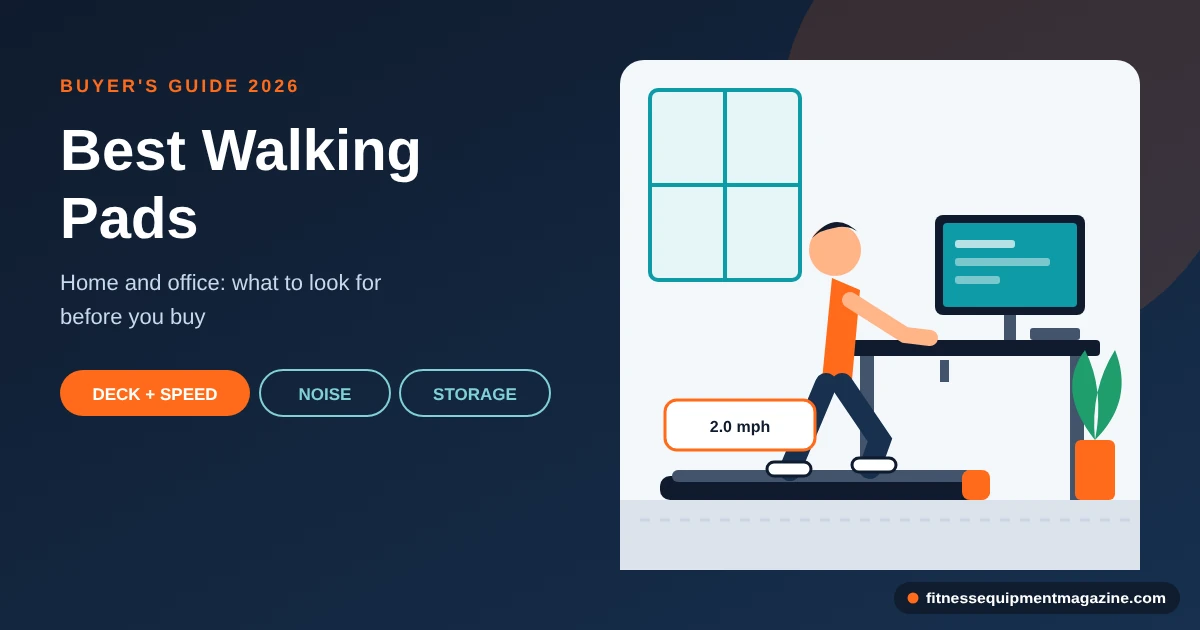
If you want to walk while you work or watch TV, shop for a flat or two-fold walking pad with a belt around 15 to 20 inches wide and about 40 to 50 inches long, a speed range that starts well below 1 mph, and a weight rating that clears your body weight by a comfortable margin. Pick a handrail version if you want to feel steady, a no-handle version if you will use it under a desk, and a longer deck if you are tall. Skip a walking pad entirely if you plan to jog or run, because that is a treadmill job.
- Best fit: desk workers, apartment dwellers, and people who want more daily movement without a 6-foot machine in the living room.
- Biggest tradeoff: a pad trades top speed, incline, and cushioning for size and price. You get portability, and you give up range.
- Most overlooked spec: how slow the pad can go and how finely you can change speed, because most desk walking happens between 1 and 3 mph.
How this guide works
How we researched this. This is a research-based guide. We have not run hands-on tests for it, so you will not find measured decibel readings, lab numbers, or “we tried it” claims. What you will find is guidance built from the patterns in manufacturer specification sheets, federal physical activity and product-safety guidance, and the ownership problems that buyers commonly report. Last reviewed: October 2026. Some links on this site may be affiliate links; if you buy through them we may earn a commission at no extra cost to you; recommendations are based on the criteria in the article, not payout.
What a walking pad is, and what it isn’t
A walking pad is a compact, low-profile treadmill built for walking speeds. It has a belt, a motor, a deck, and a remote, and it usually has no console, no tall frame, and no big incline mechanism. Most are about the size of a long yoga mat that happens to be four inches thick. You step on, press a button, and the belt starts moving at a speed you chose.
The best walking pads took off as a category because of a very ordinary problem. People work at desks, apartments are small, and a full treadmill is a piece of furniture that does not leave. A pad slides under a sofa or leans in a closet. That single trick explains almost everything about the product, including what it does well and what it cannot do.
The anatomy of the best walking pads in plain terms
Look at the diagram below before you read another spec sheet. Nearly every complaint you will see about walking pads traces back to one of these parts: a belt that is too short, a motor that is underpowered at low speed, a deck that transmits noise, or a handle that gets in the way of a desk.
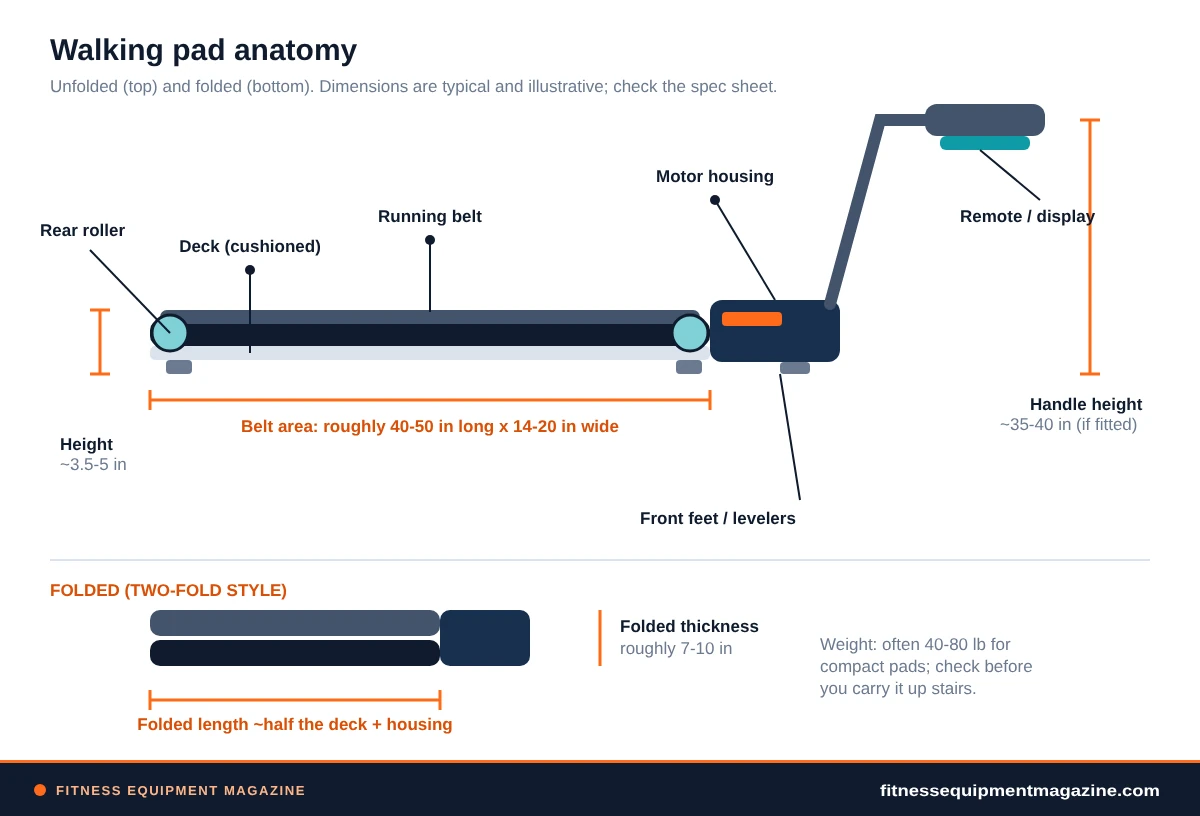
The belt is the surface you walk on. The deck is the board under it, and its cushioning decides how the pad feels underfoot. The rollers at each end keep the belt moving, the motor driver sits in a housing at the front, and the remote tells it what to do. On a two-fold model, the deck hinges in the middle so the whole thing folds in half. That is the entire machine.
A pad versus a full treadmill
A treadmill is built for a wider range of speeds, heavier loads, and longer sessions, and it carries a taller frame, a bigger motor, a larger belt, and often an incline. A pad drops most of that to save space and cost. If you are weighing the two seriously, our side-by-side breakdown of walking pad versus treadmill tradeoffs goes through space, goals, and budget in more detail than we can here.
The short version looks like this. A pad is a walking tool that you can also use for a light jog on a few models, though most are not designed for it. A treadmill is a training tool that you can also walk on. Buying the wrong one for your actual habit is the most expensive mistake when shopping for the best walking pads, and it is worth reading that comparison before you commit.
Worth knowing
Marketing language blurs these two products. A pad labeled “treadmill” or a treadmill labeled “walking pad” is common, so ignore the label and read the numbers: top speed, belt length, motor rating, and weight capacity tell you which job the machine was designed for.
What it isn’t
A walking pad is not a running machine, a hill-training tool, or a replacement for a gym. It is also not a magic habit. It makes it easier to move during a day when you would otherwise sit, and that is a real benefit. Beyond that, it is a piece of equipment that needs space, a flat floor, a power outlet, and a little care.
It is also not a medical device. Nothing in this guide is health advice, and nothing about a walking pad treats or prevents any condition. If you have a health concern, a doctor or physical therapist should guide your activity, not a buyer’s guide.
Who the best walking pads suit
Walking pads work best for people whose real problem is sitting still, not lack of training. If that sounds like you, the best walking pads can fit into your day with very little ceremony. Here are the situations where we think they earn their space.
Best walking pads for desk workers on calls
The classic buyer works at a desk, takes video calls, and wants to walk through the ones where they mostly listen. A pad at 1 to 2 mph, a headset, and a standing desk is the whole recipe. You will not break a sweat, and that is the point. It is background movement, closer to pacing around the kitchen than to a workout.
Anyone hunting for the best walking pads for desk use cares about three things above all else: noise that does not carry into a microphone, a deck low enough to slide under the desk, and a speed control that lets you hold a steady slow pace. Everything else is secondary.
Best walking pads for apartments and shared walls
If you live above someone, a treadmill’s footfall and motor hum are real concerns. A pad is lighter, quieter at slow speeds, and easier to put on a mat. It will not be silent, and a neighbor downstairs may still hear a rhythmic thump. That said, walking creates far less impact than running, and a pad at 2 mph is a gentler neighbor than a treadmill at 6 mph.
Apartment buyers shopping for the best walking pads also tend to need storage. A pad that folds to roughly the size of a large suitcase can slide under a bed or into a closet. A fixed-frame treadmill cannot.
Best walking pads for TV-time walking
Plenty of people don’t work at a standing desk at all. They want to walk for 30 minutes while a show plays. For them, a pad with a handrail often feels more secure, because there is no desk to lean on. You can hold the rail, look at the screen, and settle into a rhythm. A remote that works from across the room matters here more than an app does.
Shared rooms: where the best walking pads earn space
A spare bedroom that doubles as an office, a living room, or a dining nook all share a problem: the equipment has to disappear. Pads are among the few machines that can. The question is how much effort it takes to make that happen. A pad you can fold and slide in 20 seconds gets used. A pad you have to unscrew, lift, and wrestle into a closet will sit out in the middle of the room, which defeats the purpose.
A note for older adults and anyone with a health condition
Walking is familiar, low-impact activity, and many older adults use treadmills and pads to stay active at home. General caveats apply. Balance matters, a handrail matters, and a slow start matters. If you have trouble with balance, dizziness, a heart or joint condition, or you are unsure whether to start, talk with a clinician first. A pad with a sturdy front handrail and a safety clip is worth more than any other feature in that situation, and a no-handle under-desk model is probably the wrong choice.
For general context, the federal Physical Activity Guidelines for Americans describe weekly activity amounts for different age groups and note that some activity is better than none. We will come back to how a pad fits into that picture later, without making promises about outcomes.
Where walking pads fall short
Honest guides tell you where a product stops working. Even the best walking pads stop working in a handful of predictable places, and it helps to know them before you spend money.
Running and higher speeds
Most walking pads top out around 3.5 to 4 mph, and a few go higher. That is a brisk walk, not a run. Even pads that advertise higher top speeds usually have shorter belts, narrower decks, and lighter motors than a machine built for running. A stride gets longer as you speed up, and a 40-inch belt runs out of room quickly.
If you want to jog, the answer is not a pad with a bigger number on the box. The answer is a treadmill, and our guide to the best treadmills for home use covers the belt sizes and motor ratings that make running safe and comfortable.
Incline and hill work
Most of the best walking pads are flat. A few have manual or powered incline, and the range is small compared with a treadmill. If hill walking is part of your plan, an incline-capable pad can help a little, but the motor works harder, the deck runs warmer, and the weight capacity may drop. We cover that archetype below.
Heavier users and heavy daily use
The frame, motor, and belt on the best walking pads are sized for lighter loads and shorter sessions than a treadmill’s. If you are heavier, the weight rating is the first thing to check, and you should leave real headroom between your weight and the stated limit. If you plan to walk several hours a day, a pad’s motor will work for its whole duty cycle, and some will not tolerate that. We explain duty cycle in its own section.
Cushioning and feel
Big treadmills often use multi-zone cushioning and thick decks. Pads use thinner decks and simpler cushioning. Many people find the best walking pads perfectly comfortable at walking pace. Some find it firm or flat underfoot over long sessions, especially in thin-soled shoes. This is personal, and it is one reason a return policy matters.
Features you shouldn’t expect
Large screens, built-in workout programs, heart-rate readouts, and decline or incline training are the domain of treadmills. A pad with an app is a pad with an app. It is not a gym. If you want programmed workouts, you are shopping in the wrong aisle, and our treadmill buying guide on motor, belt size, incline and warranty gives you the terms to shop that aisle properly.
Seven walking pad archetypes worth shortlisting
We don’t name brands in this guide, because lineups change every few months and we have not hands-tested them. Instead, here are seven machine types. Each earns its place among the best walking pads because of the criteria it satisfies. Use these as a shortlist template: decide which archetype matches your life, then check real spec sheets against the criteria in the sections that follow.
About these picks. The seven archetypes below are research-based: they come from specification patterns across the category and from the problems owners commonly report. They are not rankings of specific products. Verify every number against the manufacturer’s current spec sheet and warranty before buying.
Archetype 1
The flat under-desk walker
A single-piece, ultra-thin deck with no handle, a remote, and a top speed around 3 to 4 mph. It slides under most standing desks and most sofas. Earns its place for desk workers who want the smallest possible footprint and don’t need a rail.
Watch for: thinner cushioning, no handle to steady you, and a weight cap that is often lower than on bigger pads.
Archetype 2
The two-fold pad with a handrail
The deck hinges in the middle, and a fixed or flip-up handrail gives you something to hold. Usually the best all-rounder for living rooms and TV-time walking. Earns its place on stability and confidence stepping on and off.
Watch for: a taller handle that won’t pass under a desk, and a heavier unit to carry.
Archetype 3
The pad with a removable or foldable handle
One machine, two uses. Keep the handle on for TV walking, take it off or fold it down to slide under the desk. Earns its place in households where one pad does two jobs.
Watch for: wobble at the handle joint, a clunky release mechanism, and lost hardware.
Archetype 4
The long-deck pad for taller users
A belt of roughly 47 to 55 inches gives a longer stride room to breathe. Earns its place if you are tall or have a naturally long step and found short belts uncomfortable.
Watch for: a longer folded length and more weight, which affects storage and carrying.
Archetype 5
The higher-weight-capacity pad
A sturdier frame, a stronger motor, and a stated capacity that leaves real headroom above heavier users. Earns its place because capacity ratings are about margins, not just limits.
Watch for: extra weight, higher price, and capacity claims that depend on how the maker rates “maximum user weight.”
Archetype 6
The incline-capable walking pad
A manual or powered incline adds variety for people who want gentle slope walking at home. Earns its place only if hills are part of your plan.
Watch for: more moving parts, a taller folded height, a smaller incline range than a treadmill, and a motor that works harder.
Archetype 7
The budget pad
Plain design, basic remote, a modest motor, and a shorter warranty. Earns its place for someone testing whether a pad fits their routine before spending more.
Watch for: low-end speed that isn’t slow enough, loose assembly, and thin support if something breaks.
How to use these best walking pads archetypes
Pick the archetype first, then compare specs within it. Comparing the best walking pads across types rarely works. If you try to compare an under-desk walker to a long-deck rail model on price alone, the cheaper one will always look like the better deal. It simply solves a different problem.
Some buyers land between two archetypes. A tall person with a standing desk is a common example: the long deck wants a rail, the desk wants a low profile. In that case, the removable-handle pad is the usual compromise, though you will pay for it in weight and complexity.
Where budget fits
The cheapest pad is fine if you test your habit first, and a poor choice if you already know you will walk every day. If cost is the main constraint, spend a little time with our guide to the best budget treadmills and the features that matter most, because a modest treadmill sometimes costs about the same as a mid-range pad and offers more headroom. The catch is space, which is the thing a pad is built to save.
Where pads win
- Small footprint and easy storage
- Lighter, so easier to move
- Often quieter at slow walking speeds
- Lower price than most treadmills
Where pads lose
- Low top speed, little or no incline
- Thinner decks and simpler cushioning
- Lower weight capacities and shorter warranties
- Less support if something fails
Deck size and stride: the spec that decides comfort
Belt length and width decide how natural walking feels. If the belt is too short, you will shorten your stride or drift to the front edge without noticing. If it is too narrow, you will watch your feet. Either way, you will walk less.
Belt length and your natural stride
The best walking pads commonly run belts around 40 to 50 inches long, and a few go longer. A person walking slowly takes a shorter stride than a person walking briskly, and a tall person steps further than a short one. A short belt works when you walk slowly and are not tall. A longer belt gives you slack to speed up, to shift position, and to avoid the nagging feeling that you are about to step off the front.
Here is a simple self-test. Stand in a doorway, take three relaxed walking steps, and measure from the first heel strike to the third. Divide by two, and that is a rough stride length. Add a generous margin for the belt, since your foot needs to land inside the belt with space behind it. If the stride you measure is close to the belt length divided by three, you will feel cramped.
Belt width and foot placement
Widths of about 14 to 20 inches are common on the best walking pads. A narrow belt can feel precarious if you also type or shift your weight, because your feet stay close together. A wider belt allows a natural foot lane and a little margin when you turn your head or reach for something. On the other hand, a wider belt makes a wider pad, and that affects the gap under your desk and the way it slides into storage.
If you plan to use the pad under a desk, measure your desk legs and any crossbars before you pick a width. A wide pad that won’t fit between the legs is useless there, no matter how good it feels.
Usable deck versus rated deck
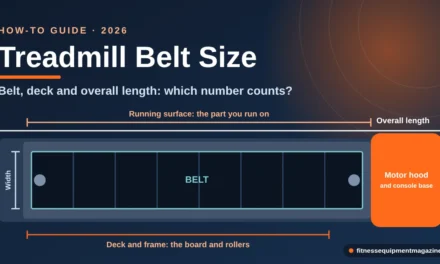
Manufacturers sometimes list overall pad length rather than belt length. The belt is shorter, because the housing and end caps take space on both ends. Others list “running surface,” which is the belt area you can stand on. The number you want is the usable running surface. If a spec sheet doesn’t state it, ask the seller or choose a different pad.
Measure twice
Tape a rectangle on the floor at the belt’s length and width, then walk inside it for a minute with your usual shoes. It costs nothing and tells you more than any review.
Speed range and why slow matters
The best walking pads rarely win on advertised top speed. Almost nobody needs it. What matters is the bottom of the range and how many steps it has between slow and moderate.
The typical speed band
Most of the best walking pads run from around 0.5 mph to around 3.5 or 4 mph. A handful extend higher. A normal comfortable walking pace for many adults falls somewhere around 2 to 3 mph, and a slow office stroll sits near 1 to 2 mph. A brisk walk is higher still, and a jog starts where most pads end. The graphic below shows where each activity sits against the speed band of a typical pad and a typical treadmill.
Speed granularity at slow speeds
Speed steps matter more than most spec lists admit, and the best walking pads get them right. If a pad changes speed in 0.5 mph jumps, your choices at the slow end are 0.5, 1.0, 1.5, 2.0. That’s fine for a stroll but coarse for typing. If it steps in 0.1 mph increments, you can tune your pace to the task, which is what people on calls actually do. Look for fine control at the bottom of the range, and for a remote that lets you change speed without looking.
Starting and stopping behavior
Pay attention to how the best walking pads start. A gentle ramp from zero is friendlier than an abrupt jump, especially when you are barefoot-curious about balance. Some pads start at a preset minimum, while others begin slowly and wait for you to press up. Likewise, how quickly the belt stops after you press stop varies. A pad that coasts for a few seconds is more forgiving than one that halts instantly, and some people prefer the opposite. Read how the manual describes it.
The top-speed myth and the best walking pads
A walking pad that boasts 7 or 8 mph still usually has a short belt, narrow deck, and light motor. The extra speed gives you a risky range where the pad is less stable than a real treadmill. If you want to run, buy something designed for running. If you want to walk, a lower top speed is perfectly fine and often comes with a quieter, smoother motor.
Motor, duty cycle, and weight capacity
Motor numbers on pad spec sheets are famously slippery, and the best walking pads are the ones that explain them. You’ll see “peak” horsepower, “continuous” horsepower, and sometimes only a vague wattage. They aren’t interchangeable, and the difference matters more at the slow end than the fast one.
Continuous versus peak output
Peak horsepower describes the most the motor can produce for a short burst. Continuous duty describes what it can sustain for a long stretch without overheating. A walking pad that you leave running at 1.5 mph for four hours a day is a continuous-duty job, even though it never goes fast. If a listing for the best walking pads only shows peak numbers, treat that as a gap in the information, not a good sign.
Pads in the market commonly list continuous ratings somewhere around the low single digits in terms of horsepower-equivalents, and many state nothing at all. When a maker gives a continuous figure and a stated daily-use guideline, that’s worth something. When a maker says nothing about how long the machine can run, send a question to the seller and see whether you get a straight answer.
Torque at low speed
Here is a quirk that surprises people. A motor can feel strong at 3 mph and still struggle at 0.8 mph, because slow speeds under a person’s weight demand steady torque. A weak pad stutters or surges at the bottom of its range, which is exactly where you want it smooth. The belt should feel the same whether you are on step one or step ten. Owner complaints about “jerky” slow-speed behavior are common enough that you should watch for them when you read feedback on any model.
Weight capacity and the headroom rule
Every one of the best walking pads lists a maximum user weight. Treat that as a ceiling, not a target. A sensible habit is to choose a pad whose stated capacity sits well above your body weight, with a margin of 50 pounds or more where you can find it. Capacity ratings reflect frame strength, motor load, and belt wear, and a pad used near its limit will run hotter, wear faster, and probably be louder.
Heavier buyers also face a quieter problem: many compact pads list lower capacities than their larger cousins. If you need a higher rating, shop that archetype deliberately, and don’t assume a low-profile model “probably holds” more than the label says. Never exceed the stated limit. The warranty almost certainly won’t cover damage that results from it.
Read the fine print
Some manufacturers rate “maximum user weight” for walking only and a lower weight for any jogging or incline. Make sure the figure you’re quoting applies to the way you’ll actually use the pad.
Duty cycle and daily hours
Duty cycle is the polite engineering term for “how long can it run before it needs a break?” Some pads advise rest periods after a stretch of continuous use, usually spelled out in the manual. Many users ignore that note until the motor housing is hot to the touch. Before you buy, look for a stated daily-use recommendation. If you plan to walk three or four hours a day, a pad that lists a short maximum session is the wrong product, no matter how small and pretty it is.
Noise: what you hear and what the floor carries
Noise is the number-one reason people return one of the best walking pads or stop using it. It comes from more than one source, and each source has a different fix. We can’t give you measured decibels because we haven’t measured anything, and a lot of published “dB” numbers are made under conditions you’ll never recreate at home. So here is the qualitative picture.
Motor and electronics
The motor produces a hum that rises with speed. At slow speeds it’s usually the quietest part of the machine. If a pad is loud at 1 mph, something is off: a stiff belt, a misaligned roller, or a design problem. At higher speeds, the hum grows, and on a hard floor in a small room it can reach conversational volume.
Footfall and impact
Your footsteps make noise too. A thin deck on a hard floor amplifies each step into a low thump. Softer shoes help, a rubber mat helps, and a stiffer, better-damped deck helps most. If you live above someone, this is the noise from walking pads that they’ll complain about, because low frequencies travel through structure far better than the hum of a motor.
Belt and rollers
A belt that’s dry or slightly off center makes a squeak or a rhythmic slap. Both are fixable, and both are covered in the maintenance section. The key idea is that a new pad is usually quieter than one that has gone six months without a check, so don’t judge noise by unboxing day alone.
Desk and floor transmission
People forget that a standing desk can act like a speaker. If the pad’s footfall travels through the floor to the desk legs, your monitor may shake a little and your microphone will pick up thumps. A dense mat under the pad and a little distance between the pad and the desk legs help, and so does pushing the pad out of contact with the desk frame.
A short noise checklist
- Ask for the slowest speed and listen first, since that’s your everyday setting.
- Place the pad on a mat or rug pad, never directly on a bare hard floor if you share walls.
- Keep the pad from touching the desk legs or any furniture.
- Lubricate and re-center the belt on the schedule in the manual.
- Walk in padded, flat-soled shoes rather than hard heels or barefoot on a thin deck.
Controls, safety features, and app dependence
Controls decide whether a pad feels like a tool or a gadget, and the best walking pads keep them plain. The best walking pads keep them simple and place the safety features where you can reach them without thinking.
Remote, display, and buttons
Most of the best walking pads come with a small remote. Good ones have large buttons you can find by feel, a clear start, a stop, and speed up and down. Cheaper remotes are small, easy to lose, and have tiny buttons you can’t press without looking. A built-in button on the pad itself, plus a spare battery or a wrapped cord, makes a remote loss less annoying. Many pads also show speed, time, distance, and steps on a basic display. Treat those counters as rough estimates, not precise measurements.
Safety key or clip, and auto-stop
A safety key is a tether that attaches to your clothing and stops the belt if you move away from it. Many full treadmills have one. Many pads do not, or they rely on a remote instead. If you want a pad with a handrail, look for a safety key. If you use a no-handle pad, look for sensors or auto-stop behavior that halts the belt when you step off. Both reduce the chance of a runaway belt, and both belong on your checklist.
Some pads also include a start delay or a countdown, which is a small but useful courtesy. You step on, the display counts, and the belt begins slowly. Don’t dismiss it as a gimmick if you ever have a child or a dog in the room.
App dependence in the best walking pads
Many walking pads connect to a phone app for tracking, programs, or control. That is fine as a bonus and a risk as a requirement. A few questions will save you grief later.
- Can you operate the pad fully with the remote, even without a phone?
- Does the app require an account, and what happens to your data if the company changes direction?
- Is there a subscription for features you think you’re getting for free?
- Does the pad keep working if the app is discontinued or fails to update?
A pad that depends entirely on an app to start or stop is a pad that can fail on a Wednesday morning because of a software update. Treat the app as a convenience. Make sure the hardware stands alone.
A privacy note
Apps that track steps, speed, and time can also collect account information and location. Read what the app asks for, and decline permissions it doesn’t need. That is general consumer hygiene, not a reason to avoid apps entirely, but it’s worth five minutes.
Cushioning, belt feel, and stability
Cushioning is the part of the best walking pads that’s easiest to oversell and hardest to judge from a product page. Words like “shock absorption” and “multi-layer” appear on everything.
What cushioning really means on a pad
A pad’s deck is thin, so cushioning is mostly a rubber or foam layer between the deck and the floor, or a slightly flexing deck. At walking speeds, that’s enough for most people. Cushioning that’s too soft can feel unstable and tire your ankles, while cushioning that’s too hard can feel like walking on a board. Comfort at moderate softness is usually the sweet spot, and it’s different for different bodies.
Belt texture and grip
The belt surface should feel grippy but not sticky. A smooth, slippery belt with a socked foot is an accident waiting to happen. A belt with a mild texture, plus a pair of sneakers with decent soles, gives you traction without effort. Many pads add side rails or raised edges to show where the belt ends. Those are a useful visual cue when you’re looking at a screen instead of your feet.
Floor stability in the best walking pads
A pad should not rock, slide, or tilt. Four feet that sit flat on a hard surface, adjustable levelers, and a frame that doesn’t flex are all signs of good stability. On carpet, a pad may sink at the corners and tilt, so choose a stiff mat beneath it or place it on a hard floor. If you notice a slight rocking on first use, level the pad before you walk on it. A pad that rocks wears its rollers unevenly and may wander off center.
Handrail stability
If your pad has a handle, give it a firm shake. A handrail that wobbles at the base won’t steady anyone, and one that bends when you lean could fail at the worst time. Pads with removable handles should lock tight, and the locking mechanism should be easy to operate without tools. When reading feedback, search for the words “wobble” and “loose” alongside the handle. That’s where the truth lives.
Desk fit and standing-desk compatibility
The most frequent reason a desk-walking setup fails has nothing to do with the best walking pads on the market. It’s the desk. A standard fixed desk sits at about 29 to 30 inches, which is too low for standing and walking. If you plan to walk while you work, you need a desk that rises to your elbow height when you stand on the pad, and that’s usually somewhere between roughly 38 and 45 inches for most adults, depending on height and shoe thickness.
Measure your elbow height first
Stand in the shoes you’ll wear, relax your shoulders, and bend your elbows to about a right angle. Have someone measure from the floor to the underside of your forearm. Add the pad’s deck height, since you will be standing a few inches higher on the belt. That number is your target desk height. If your desk can’t reach it, a desk riser or a sit-stand converter might, but check the converter’s range and stability first.
Clearance under the desk
If you want the pad to slide under the desk between sessions, measure three things.
- Gap under the lowest crossbar.Pads with a handle that folds down are usually 4 to 6 inches tall, but a handle that stays up can’t go under anything.
- Width between the desk legs.Compare it with the pad’s width, plus a little breathing room on each side.
- Depth available.The pad will need to be pulled out far enough that the desk doesn’t crowd you when you walk.
Standing desk compatibility
Electric standing desks paired with the best walking pads can be heavy and are sometimes sensitive to vibration. A desk with a long, thin column may wobble if the floor transmits footfall. Before you commit to a setup with the best walking pads, place the pad on the floor near the desk and walk for a minute while you watch your monitor. If the screen trembles noticeably, a heavier base, a dense mat, or a different desk position is worth trying. Keep the pad from touching the desk frame, because contact turns the desk into a speaker.
Cables and the walking path
Route power and monitor cables away from the pad. A loose charger cord dangling at foot level is both a trip risk and an annoyance. Use cable ties or a cable tray to hold things at desk level, and keep the walking path clear of anything you can snag with a shoe.
Quick test
Before the pad arrives, mark its footprint on the floor with painter’s tape and sit through one workday with the desk raised to your target height. If the desk, chair, and cables all still work around that rectangle, the setup will probably survive real life.
Storage, floors, power, and assembly
Even the best walking pads won’t stay stored if storing them is a chore. Ask yourself where it will actually go on a normal day, not where the product photos put it.
Folded size and weight
Look for the folded dimensions, not just the unfolded ones. A two-fold pad usually folds to roughly half its deck length plus the motor housing, and around 7 to 10 inches thick. Weight varies, but compact pads often land in the range of about 40 to 80 pounds. That’s easy to drag across a floor and awkward to lift up a flight of stairs. If you plan to carry it to a closet daily, try lifting something of similar weight first.
Wheels and handles
Transport wheels on one end make a huge difference. You can tilt the pad onto them and roll it away. Check that the wheels sit high enough off the floor that they don’t scrape when the pad is in use, and that they don’t bear weight while you walk. A carry handle in the deck or housing is also worth looking for.
Floor protection
Put a mat under any pad. A thin rubber mat or a purpose-made equipment mat protects hardwood from scratches and dents, damps vibration, and keeps the pad from creeping. On carpet, a mat prevents the corners from sinking and keeps lint out of the motor housing. Pick a mat that is bigger than the pad and thick enough to matter, but not so thick it tilts the machine.
Power and cord management
Walking pads plug into a standard wall outlet through a power adapter or a direct cord. Keep a few points in mind.
- Plug the pad directly into a wall outlet or a surge protector rated for the load, and avoid sharing the outlet with other high-draw devices.
- Avoid thin extension cords, which can overheat.
- Route the cord along the wall and out of the walking path.
- Unplug the pad when you leave on a long trip or when it’s stored away.
Assembly and unboxing
Most of the best walking pads arrive nearly built. A handrail version may need the handle attached, which involves a few bolts and a hex key. Unpack in the room where you’ll use it, since a pad is hard to carry in its box. Keep the packaging for the first weeks in case you need to return it. Before you walk on it, read the manual’s startup steps, check the belt is centered, and make sure the feet are level.
Warranty and support for the best walking pads
Warranties on the best walking pads tend to be shorter than on full treadmills. Typical structures split coverage into parts and labor, and frames, motors, and electronics may be covered for different lengths. Read what’s actually included: Is the belt a wear item? Does the maker cover shipping for a repair? Does the warranty require the original receipt or registration? Support quality matters as much as the length of the warranty. A one-year warranty with responsive support beats a three-year warranty that goes silent. For a deeper explanation of how warranties are usually structured, our treadmill buying guide breaks down the terms.
Return policy
Ask about returns before you buy. A pad is heavy and bulky, and some retailers charge a restocking fee or require you to repack it in the original box. A generous trial period lets you check noise, fit, and feel in your own space, which no spec sheet can promise.
Desk ergonomics and a gentle ramp-up
Walking at a desk on one of the best walking pads is a different posture from sitting, and a few small adjustments make it comfortable. Everything in this section is general ergonomics, not medical advice.

Desk and monitor height
Set the desk so your elbows rest at roughly 90 to 110 degrees with your forearms about level. Raise the monitor so the top edge sits near eye level, and keep it an arm’s length away. When the screen is too low, your head drops forward and your shoulders follow. When it’s too high, your neck tilts back. Both feel fine for five minutes and tiring after an hour.
Wrists, typing, and mouse accuracy
Walking adds a subtle bounce to your hands. At 1 mph, most people type without trouble. At 2 mph, mouse precision starts to slip, and at 3 mph, fine work like editing images becomes frustrating. Keep your wrists neutral, avoid resting them on a hard desk edge, and consider a larger mouse or a trackball that stays steady. A keyboard on a negative tilt can help too. If accuracy matters for a task, slow down or stop the belt and stand still.
Shoes
Wear flat, cushioned shoes with a grippy sole on any of the best walking pads. Barefoot or sock-only walking on a pad is risky, because belts can feel slick and you can’t feel the edge. Dress shoes with a hard heel are noisy and unstable. A simple pair of sneakers you keep by the pad solves the problem, and it makes the habit easier to start.
A gradual ramp-up routine
Most people with new walking pads overdo it in the first week and quit by the third. A slow ramp-up is friendlier. The schedule below is a general pattern, not a prescription. If you have any health concern, ask a clinician before you start.
- Week one: get used to the belt.Walk at the slowest comfortable speed for 10 to 15 minutes, holding the handrail if there is one. Don’t answer emails or take calls yet.
- Week two: add light tasks.Keep the speed low and begin reading or listening to calls. Notice where your balance feels shaky and fix the setup.
- Week three: add typing.Try short bursts of typing at your slowest speed. Stop the belt for anything that requires precision.
- Week four and beyond: build in rhythm.Pick two or three regular windows during your day and let them become part of your routine. Extend gradually as it feels easy.
If you feel dizzy, short of breath in a way that worries you, or notice pain, stop and seek advice. Don’t push through it to hit a step goal.
Safety around kids, pets, and cords
The best walking pads look harmless, and at 1.5 mph they mostly are. But a moving belt is a moving belt, and a house with children or animals has a way of finding the one gap you didn’t plan for.
Kids and pets
Curious toddlers like buttons, remotes, and the rhythm of a moving belt. Dogs and cats like to lie in warm, quiet spots, and a stored pad under a sofa qualifies. Build a few habits and you’ll avoid most trouble.
- Unplug the pad or remove the safety key when you’re done, every time.
- Keep the remote out of reach, in a drawer or on a high hook.
- Fold or store the pad where children and pets can’t crawl under or behind it.
- Never leave a child unattended near a running belt, and never let a child ride on the belt with you.
- Call the dog away before you start, and check around the machine before you press start.
Safety first
Moving belts can pinch fingers and tails and can pull loose clothing or hair. Keep hands, feet, and everything else clear of the rollers and the gap at the belt’s end.
Stepping on and off
Most falls on walking pads happen at the start or the stop, not in the middle. Stand with your feet on the side rails before you start the belt, hold the handrail if you have one, and step on only after the belt is moving at the lowest speed. When you finish, slow the belt, stop it, and wait for it to come to a complete stop before you step off. Don’t hop off a moving belt, and don’t rush back to answer the phone.
Stopping behavior
Different walking pads stop in different ways. Some brake almost immediately, some coast, and some ramp down. Learn your pad’s behavior during a quiet moment, not during a call. Know where the stop button is on the remote, on the pad, and on the safety key if you have one. Keep the remote where you can see it, not buried under a keyboard.
Slippery socks, loose clothing, and distractions
Socks on a belt make a slippery combination. Long drawstrings and loose pant hems can catch on the front or back of the pad. Phones are a hazard too, especially when you scroll while you walk. If you’re doing anything that takes your eyes off the belt, drop the speed. A walking pad rewards boring, steady attention.
Cord and trip hazards
Power cords, charger cables, and extension cords are the usual culprits. A cord that crosses the walking path or the stepping-on side can catch a foot. Tape it down or route it along a wall. Also be careful with a pad stored on its side in a hallway, because a bumped pad can fall and hurt someone.
Check CPSC before you buy and after
The U.S. Consumer Product Safety Commission publishes recalls and safety warnings for exercise equipment. Before you buy, search its exercise equipment recall list for the brand and type of machine you’re considering. After you buy, register the pad with the manufacturer if it offers registration, because that’s how a recall notice finds you. Check again once or twice a year, and save your model number somewhere you can find it.
Maintenance that keeps a pad quiet
The best walking pads are simple machines, and the maintenance is simple too. The trouble is that it’s easy to ignore until something squeaks, smells hot, or drifts to one side. A few small habits delay all of that.
Read the manual’s lubrication guidance
Some belts are pre-lubricated and need periodic applications. Others are marked as maintenance-free, and some warn against adding lubricant at all. The right answer depends entirely on the make, so check the manual. If it calls for lubricant, use the type it names, apply a small amount in the place it shows, and follow the interval. Using the wrong product can damage the belt or leave a slippery residue. When the manual says nothing, ask the manufacturer before you reach for a spray.
Belt tracking and centering
A belt that drifts to one side will rub the deck edge, make a scraping sound, and wear out early. Check the gap between the belt and each side of the deck from time to time. If one side is much tighter than the other, the manual probably has an adjustment procedure using a hex key at the rear roller. Make small turns, a quarter turn at a time, and run the belt between changes. Big corrections tend to overshoot.
Belt tension
A slack belt can slip under your foot, and an over-tight belt strains the motor. If the belt hesitates when you step on, check the manual before you tighten anything. The tension adjusts at the same rear bolts as tracking, so make your changes small and equal on both sides.
Cleaning and dust
Wipe the belt and side rails with a barely damp cloth, and skip harsh sprays. Vacuum around the motor housing and under the deck, especially if you have pets or carpet. Dust and fur get into the front housing and make the motor run hot. Never pour liquid on the pad, and never run it while it’s wet. If you spill a drink, unplug the pad first.
A monthly five-minute check
- Unplug and look.Check the cord for kinks or nicks, and the plug for any sign of heat damage.
- Check the bolts.Tighten any handle or frame bolts that have loosened.
- Check the belt.Look for fraying edges, a shiny worn patch, or off-center drift.
- Vacuum.Clear dust from the housing vents and under the deck.
- Run it.Listen for new squeaks, thumps, or a burning smell at slow speed.
When to stop using it
A burning smell, smoke, a cord that’s hot to the touch, or a belt that jerks hard are all reasons to stop and unplug. Contact the manufacturer. Don’t keep walking on a pad that you suspect is overheating just because the warranty period has not ended.
Using a pad for steps and daily movement
The best walking pads make low-key movement easier, and that’s their real value. They don’t make you more disciplined. They remove a few excuses, such as weather, travel time, and a cramped gym. What you do with that extra convenience is up to you.
Activity guidelines for context
The federal Physical Activity Guidelines for Americans give general weekly activity targets for adults and note that moving more and sitting less are both worthwhile. A slow desk walk isn’t the same as a purposeful moderate-intensity walk, and one doesn’t automatically substitute for the other. Think of the best walking pads as a way to add movement in places where you’d otherwise be still, not as a guarantee of any specific outcome.
A word about step counts
The step count on a pad’s display is an estimate. It may be based on belt speed and time rather than counting actual steps, and it can differ from your phone or watch. That’s fine for a rough sense of how long you were on, but don’t treat it as precise. If steps matter to you, compare the pad’s number with a wearable once and note the difference.
Pair walking with things you already do
The people who keep using the best walking pads tend to attach them to an existing habit: the morning call, the afternoon reading block, the nightly show. Pairing makes the pad part of the routine instead of an extra chore. It also keeps sessions short and easy to repeat, which beats an ambitious plan that falls apart by Thursday.
What to skip
Don’t use a pad as a substitute for sleep, a doctor’s advice, or a plan from a trainer. Don’t promise yourself a result. And don’t buy a faster, bigger pad “to grow into” unless your plan really includes faster walking, because that headroom often costs space and money you’ll resent.
Mistakes that make a pad a closet ornament
After reading through the usual ownership complaints about even the best walking pads, a few patterns stand out. Almost none of them are about product quality. They’re about mismatch between the buyer and the machine.
Buying the pad before fixing the desk
Even the best walking pads can’t help if the desk is too low, the monitor is too far, or the chair is still in the way. Sort out the workspace first, and the pad becomes a simple add-on. Skip it, and you’ll end up with a machine you use for five minutes before the setup annoys you.
Shopping on top speed
Top speed is the easiest number to compare and the least relevant when you shop for the best walking pads. Look at the bottom of the speed range and the step size instead. A pad with a lovely 1.0 mph is more useful than one that reaches 6 mph and jerks at 0.8.
Ignoring headroom on weight
Buying a pad rated just above your weight is tempting, because it costs less. But the motor and frame run closer to their limits, and the pad ages faster. Give yourself a margin, and read the weight note about walking versus jogging.
Assuming it will be silent
It won’t. The best walking pads are quieter than a treadmill at slow speeds, though still audible. If your calls are sensitive or your neighbors are close, plan the mat, the shoes, and the placement before the box arrives.
Forgetting to plan where it lives
Folded dimensions, weight, and a clear route to the closet all matter. A pad that stays out is a pad that collects clutter, and it’ll end up under a pile of laundry.
Starting too hard
Two hours on day one with new walking pads is a quick way to quit on day four. Begin slow and short, and let comfort set the pace. Nobody is grading you.
Skipping the fine print
Return windows, warranty terms, app requirements, and recall checks are the dull parts of buying the best walking pads, but they’re where most of the real trouble hides. Read them while you can still change your mind.
Best walking pads for a real office, not just a spare room
Everything so far assumes a home. But the title promises both, so let’s talk about a shared workplace. Putting one of the best walking pads in an office changes the rules, because other people, building policies, and facilities staff now have opinions.
Ask before you roll it in
Talk to your manager or facilities team before you buy. Some buildings restrict electrical devices at desks, some have flooring that can’t take a mat, and some landlords care about vibration in shared floors. A short note that explains the machine’s size, its noise level at slow speeds, and your plan for storage usually goes a long way. Offer to try it for two weeks and adjust.
Open-plan noise and etiquette
In an open office, your neighbors will hear what a home neighbor would hear, only at closer range. A pad at 1 to 1.5 mph on a mat is usually unobtrusive, but footfall on a hollow floor can annoy people who sit close. Pick a quieter corner, avoid start-and-stop cycling during meetings, and keep your speed low when others are on calls. A quiet pad is part of the best walking pads for offices, and good manners finish the job.
Shared pads and hygiene
If several people will use one machine, a stable, easy-to-clean model with a sturdy rail and a clear display matters more than ultra-slim design. Wipe the remote and the rail between users, and agree on who adjusts the speed. A weight limit that covers everyone on the team is a requirement, not a suggestion. Heavy shared use also shortens the maintenance interval, so write the monthly check from the maintenance section on a sticky note.
Liability and a quick word on rules
Employers sometimes ask for a short sign-off before equipment appears in a workspace. That’s reasonable. A pad is a moving machine, and a fall at work is a different conversation from a fall at home. If you are the one setting this up for a team, take the safety section of this guide to the person responsible for the building, and ask what the policy says.
The meters above are an editorial judgment, not survey data. They show how we would weight each criterion for the buyer named beside it, and they are a reminder that the same specs do not matter equally to everyone.
What owning one of the best walking pads really costs
We aren’t going to quote prices here, because they move every month and differ by retailer. We can, however, show you the shape of the cost so nothing surprises you. In the US market in late 2026, pads sit well below most full treadmills, though the gap closes when you add the extras.
The purchase and the extras
- The pad itself, including any shipping or white-glove delivery fee.
- A mat for the floor, sized to the pad.
- A standing desk or converter, if you don’t already own one.
- A surge protector or a dedicated outlet, if the nearest outlet is far away.
- Lubricant or cleaning supplies, if the manual calls for them.
- A small shelf, hook, or box for the remote and the safety key.
Running costs and repairs
Electricity use for a slow walking pad is modest, and for most households it’s a rounding error on the monthly bill. The bigger costs come later: a belt that wears out, a remote that goes missing, or a motor board that fails just after the warranty. Ask what replacement parts cost and whether the maker sells them directly. A pad with no spare-parts program is a pad you may have to replace entirely.
Resale and used pads
Used pads appear often because many people buy and quit. A secondhand pad can be a bargain, but it comes with hidden risks. You won’t know the belt’s wear, you can’t see the motor’s history, and the warranty usually doesn’t transfer. If you go that route, ask for the model number, check it against CPSC, ask how many hours it ran, and inspect the belt and the cord in person. Treat a used pad the same way you’d treat a used bike helmet: only if you can verify its condition.
Cost per use, honestly
The cheapest of the best walking pads is the one you use daily. A well-chosen model that gets used for years will cost far less per walk than a bargain model in a closet. That’s the whole case for spending a little more on the right archetype, and it’s also the case for starting small if you’re unsure.
Your first week with one of the best walking pads
The first week with the best walking pads sets the tone. If it’s smooth, the pad becomes a habit. If it’s awkward, the pad turns into a clothes rack. Here’s a simple plan.
Unboxing day
Open the box in the room where it will live. Check for transit damage on the deck, the housing, and the cord. Take a photo of any dent or scratch before you do anything else, because it makes a return or a claim easier. Register the product, write the model and serial numbers where you can find them, and then set the pad on its mat.
The first walk
Do a dry run with the belt empty. Press start, watch the belt move at its slowest speed, then stop it. Learn the stop button on the remote, on the pad, and on the safety key. Next, step on slowly with a hand on the rail or the desk, and walk at the lowest speed for a few minutes. Don’t multitask yet.
Tune the setup
After a few sessions, adjust the desk and monitor, and see whether the mat shifts, the cord snags, or the belt drifts. Fix these small things early. Tiny annoyances compound, and the best walking pads lose to annoyance more often than to any technical flaw.
Decide by the end of week two
Most return windows are short. Use the first two weeks to answer a few honest questions: Is the noise acceptable? Can you put it away in under a minute? Does it fit your desk? Do you actually use it? If the answer to any of these is no, return it while you still can, and use what you learned to pick a different archetype.
A buying workflow for the best walking pads
Here is the order we’d work in if a friend asked for help choosing one of the best walking pads. It moves from your space and habits toward the machine, not the other way around. Skip a step and you’ll probably pay for it later.
Shortlist reminder. The steps below turn the archetypes and criteria into a decision. They are research-based, drawn from spec-sheet patterns and common owner problems, not from our own testing. Verify current specs, warranties, prices, and recalls with the maker and with CPSC before you pay.
The eight steps
- Decide what the pad is for.Write one sentence: “I will walk at X while doing Y, in Z room.” If Y includes jogging, stop here and look at treadmills.
- Measure the room and the desk.Record the desk height range, the gap under the desk, the floor type, and the storage spot with its door width.
- Pick the archetype.Match your sentence to one of the seven types. Under a desk with no rail? Flat walker. TV walking? Two-fold with a rail. Both? Removable handle.
- Set your must-haves.Slowest speed, belt length, weight capacity with headroom, and a remote that works without an app.
- Compare three spec sheets.Read the usable belt size, continuous motor rating, weight limit, folded size, weight, and warranty terms. Ignore the marketing headlines.
- Read owner feedback for patterns.Look for repeated complaints about noise, slow-speed stutter, remotes, handles, and support. One angry review is noise. Twenty similar ones are a signal.
- Check recalls and the return policy.Search CPSC, confirm the trial window, and ask who pays return shipping.
- Buy, set up, and test in week one.Level it, put it on a mat, learn the stop button, and walk slowly. If something feels wrong, return it inside the window.
Questions to ask a retailer or the maker
You don’t need to be shy about asking, and a good seller will answer directly. If the answers are vague, treat that as information. These questions turn a marketing page into facts.
- What is the usable belt length and width, not the overall pad size?
- What is the slowest speed, and what is the speed step size?
- Is the motor rating continuous or peak, and is there a daily-use guideline?
- What is the weight limit for walking, and is it lower with an incline or a handle fitted?
- What are the folded dimensions and the shipped weight?
- Does it work without the app, and does the app require a subscription?
- What does the warranty cover on frame, motor, belt, and electronics, and who pays for shipping?
- What is the return window, and is there a restocking fee?
Red flags in a listing
- No belt dimensions, only an “overall size” figure.
- Only peak horsepower, with no continuous rating and no weight-class details.
- Photos that never show the underside, the folded state, or the controls.
- A top speed far above the belt length’s comfort zone.
- A warranty that excludes the belt, the motor, and shipping all at once.
- Required app accounts with no mention of what happens if the service ends.
Four hypothetical shopper profiles
These are made-up examples to show how the criteria combine. They’re not real customers and not real products. Match your situation to the closest one, then adjust.
Profile A
Maya, remote analyst, small apartment
Works from a standing desk in a one-bedroom, takes four calls a day, and has a neighbor below. She needs a very slow minimum speed, a deck she can slide under the desk, and a dense mat. The flat under-desk walker is the best fit. She should skip the handle and put noise first.
Profile B
Dev, tall, living-room TV walker
Over six feet, wants to walk during evening shows, and has no desk to lean on. A long-deck pad with a rail suits him. He cares about belt length and handle stability more than size.
Profile C
Rosa, shared office room, heavier build
Her spare room is also the kids’ homework spot. She needs a higher weight capacity with clear headroom, strong support, and a fast fold. The high-capacity two-fold with a handle is the best fit, even though it costs more and weighs more.
Profile D
Sam, curious but unsure
Hasn’t walked at home before and doesn’t know whether the habit will stick. A budget pad with a generous return window is a sensible experiment. If it works, upgrade later with a clearer idea of what matters.
Pad or treadmill: a quick decision rule
Many shoppers start with the best walking pads and end up at a treadmill, or the other way around. That’s healthy, as long as you do it before you buy. A few plain rules will keep you honest.
Choose a pad if
- You only plan to walk, and your top pace is a brisk walk.
- The machine has to disappear after each session.
- You want to work or watch TV while you move.
- Your space or budget rules out a full-size frame.
Choose a treadmill if
- You expect to jog or run at any point in the next year.
- You want real incline or structured programs.
- You’re heavy enough that a pad’s weight limit leaves you no margin.
- You have a permanent spot and want a machine that lasts years of daily use.
If you land in the second list, the right next read is our guide to the best treadmills for home use. If you straddle both lists, the dedicated walking pad versus treadmill comparison will help you weigh space, goals, and cost side by side.
A closer look at incline-capable pads
Incline is the feature that most often tempts people to buy more machine than they need. A small incline can change how walking feels, and some buyers enjoy it. But on a pad, incline usually comes from a manual lift or a short powered range, and the whole machine gets taller and heavier. The folded profile grows, the weight rating may shrink, and the motor works harder against the same belt.
Ask yourself whether you’d use incline at least a few times a week. If the answer is “maybe,” skip it. If the answer is “yes, and I’d miss it,” compare the incline range and the folded height carefully, and check whether a small treadmill would serve you better. In that case, our budget treadmill guide shows what a low-cost machine can and can’t deliver.
Myths and facts about the best walking pads
The category attracts a lot of confident claims. A few of them deserve a second look before they influence what you buy.
Myth: a walking pad is silent
Fact: the best walking pads tend to be quieter than treadmills at walking speeds, but they’re not silent. The motor, the belt, and your footsteps all make noise, and a thin deck on a hard floor can carry the thump a long way. A mat, soft shoes, and good placement do more than any “silent motor” slogan.
Myth: higher horsepower means a better pad
Fact: horsepower numbers on pads are often peak figures that say little about everyday use. A pad with a modest but steady continuous rating and smooth low-speed control will serve a desk walker better than a flashier number on the box.
Myth: a pad with a high top speed can replace a treadmill
Fact: speed alone doesn’t make a pad safe for running. Belt length, deck width, frame stability, and motor design matter, and most pads fall short on all four once you leave walking pace.
Myth: the app is where the value is
Fact: the best walking pads work well without an app. Treat apps as a bonus, and prefer the best walking pads that stand on their own hardware.
Myth: more minutes always means better
Fact: comfort, setup, and sustainability matter more than hours. Short sessions you keep doing beat long ones you abandon. And walking is not a substitute for personal medical guidance.
Best walking pads: your questions answered
Choosing and sizing
What are the best walking pads for a home office?
The best walking pads for an office are usually flat or two-fold models with a belt around 40 to 50 inches long, a very low minimum speed, fine speed steps, and a quiet motor at 1 to 2 mph. They should slide under your standing desk or fold away in seconds. Pick a model with a remote that works without an app, and check the weight limit and warranty before you worry about extras.
How fast do walking pads go?
Most walking pads run from roughly 0.5 mph up to about 3.5 or 4 mph, and a few go higher. That covers a slow stroll through a brisk walk. Pads that advertise much higher speeds usually keep a short belt and a light motor, so they feel less stable than a treadmill at those speeds. Check the minimum speed and the step size, because slow control matters most.
Speed, floors, and noise
Can I run on a walking pad?
Generally, no. Most pads are designed for walking, with shorter belts, narrower decks, and lighter motors than a running treadmill. A few advertise a jog mode, but the manual may lower the weight limit when you do. If you want to run, buy a treadmill designed for it. If you only want to walk, a pad is the right and cheaper tool.
Can I use a walking pad on carpet?
Many pads can, but the manual decides. Carpet can trap lint in the motor housing, tilt the frame, and make the belt wear unevenly. A firm mat under the pad helps, and a hard floor is easier on the machine. If the manual forbids carpet use, follow it, because the warranty may depend on it.
Are walking pads quiet enough for video calls?
At slow speeds, many are quiet enough for most calls, though none is silent. Motor hum rises with speed, and your footsteps can come through a microphone, especially on a hard floor. Use a mat, wear soft shoes, keep the pad away from the desk legs, and use a headset microphone close to your mouth. Drop to your slowest speed when you speak.
How much weight can a walking pad hold?
Capacities vary by model, and compact pads often list lower limits than full treadmills. Choose a pad that rates well above your body weight, ideally with a margin of 50 pounds or more, and confirm the limit applies to walking and to any incline or handle. Never exceed the stated limit, because the warranty and safety margin both depend on it.
Care, storage, and value
Do walking pads need lubrication?
It depends on the make. Some belts are pre-lubricated and need periodic treatment, while others are sold as maintenance-free. The manual is the final word, so use the type of lubricant it names and the schedule it gives. If the manual is unclear, ask the manufacturer before you spray anything on the deck.
Where should I store a walking pad?
Under a sofa or bed if it’s thin enough, or folded upright in a closet if it’s not. Measure the gap or the closet before you buy, and compare it with the folded size on the spec sheet. Unplug the pad, remove the remote, and keep it where children and pets can’t crawl under or behind it.
Is a walking pad worth it compared with a treadmill?
If you only walk and need the machine to disappear, the best walking pads are often the better value. If you want to run, use incline, or walk for hours every day, a treadmill usually lasts longer and offers more headroom. Compare your top speed, your space, and your budget honestly. Our comparison guide goes deeper on how the best walking pads stack up against treadmills.
Conclusion and next steps
The best walking pads are the ones that disappear into your day. They fit the desk, they go quiet at the speed you actually use, they fold into the space you actually have, and they come from a seller who will answer a question. Everything else about the best walking pads, including top speed and flashy apps, is decoration.
If you take one thing from this guide, make it this: decide what the pad is for, measure the room, and pick the archetype before you compare prices. Then use the questions above on three spec sheets, check recalls, and keep the receipt for the return window. That process is a little tedious, and it’s still faster than returning a 60-pound box.
Next, set up the workspace first, start slow, and let the habit build gradually. For a broader sense of the whole category, bookmark this list of the best walking pads for home and office, then read the buying guides linked below when you are ready to compare machines in detail.
Sources and further reading
- Physical Activity Guidelines for Americans (HHS, ODPHP) — general federal activity guidance for context.
- CPSC exercise equipment recalls — check recalls and safety warnings before and after you buy.
- ACSM top fitness trends — background on why home and wearable-driven fitness keeps growing.
Last reviewed: October 2026. How current is this? Specs, prices, warranties, app terms, and recalls change often, so verify them with the maker and check CPSC before you buy. Some links on this site may be affiliate links; if you buy through them we may earn a commission at no extra cost to you; recommendations are based on the criteria in the article, not payout. This guide is general information, not medical advice.